
This seems to be a problem with some Dells. It also seems to not be remedied with the usual tricks, like BIOS updates, tweaking the BIOS, running Dell Update or SupportAssist. I know because I’ve tried them all suggestions. It made participating to teleconferences (with any tool) extremely difficult.
The last thing I tried was to alter the Maximum Processor State:
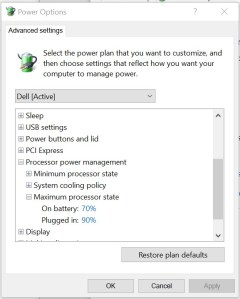
And it seems to be working.
 Managing organized complexity
This solution can also help with CPU related coil whining “issues”.
I used a similar workaround on my ASUS Zenbook Pro 15 (using i7-9750H)
This can also help with CPU related coil whine “issues”.
I had applied a similar workaround to my ASUS Zenbook Pro (i7-9750H).